 It was weird noticing many not talking about the Apple iPhone in Malaysia. Hence, the first article I wrote; Why Malaysia is Not Talking about the iPhone? Then approximately 2 months later at a recent Apple event, Steve Jobs announced the new line of iPod Nano together with the iPod Touch.
In less than a week, I got wind many who were reselling Apple iPhone in Malaysia. Some were doing it through the Low Yat forum while others ordered through blogs like iPhones Unlocked. And thanks to Shiew from iPhones Unlocked, I’ve a 7-day (or longer) ownership of my very own Apple iPhone in Malaysia.
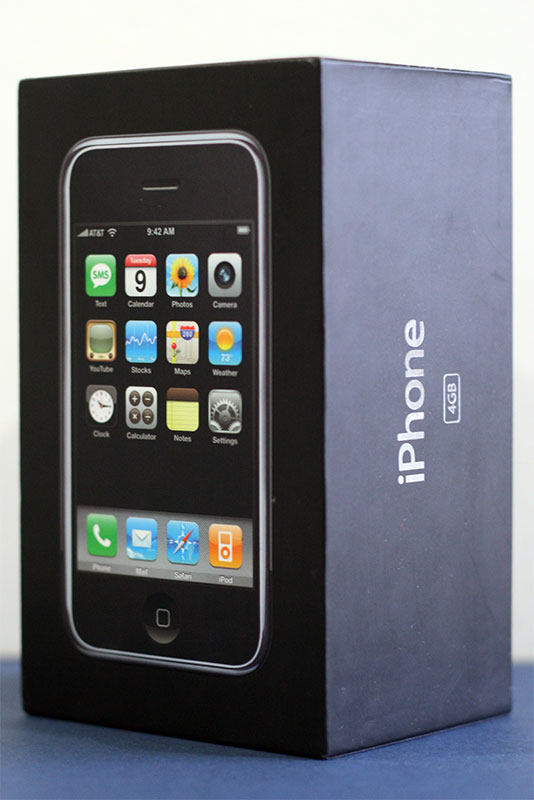 I collected the Apple iPhone from Shiew at Centrepoint around 10am. To my surprise, I never did realize how thin the Apple iPhone would really be. Upon delivery, he helped me activate the Apple iPhone and showed me what was needed to be done if I needed to activate another sim card.
Just in case many do not know, the Apple iPhone can be used in Malaysia with DiGi and Celcom networks. However, you will have a problem receiving incoming calls on a Maxis account. Because of this, I’ve went out of the way to purchase myself a DiGi starter pack.
 The activation of the sim card on my Apple iPhone was relatively easy. The wireless worked great as well while at Starbucks with Shiew. He even proved to me the YouTube function now works with the firmware; 1.0.1. The newest firmware is 1.1.1 but the folks of iphonesimfree and iPhones Unlocked are working out the kinks before an official release.
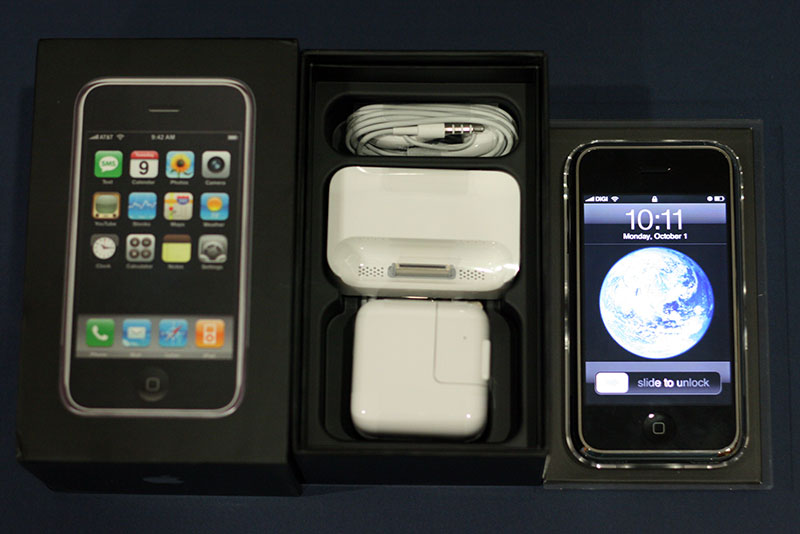 After the collection of my Apple iPhone I headed home and fiddle with my new found toy. As usual coming from Apple, the packaging is top notch and the contents are placed very tightly and neatly in the box. In the package, you will receive a pair of earphones, a dock (which contributes the weight), a wall plug (though American standard) and a USB sync cable. Inside a thin black package, you’ve got a quick iPhone tutorial leafleft, an iPhone terms and conditions and a cleaning cloth. Trust me, by the end of the day you would be anal about cleaning the Apple iPhone. Especially with all the oily food we eat in Malaysia.
Once I was done inspecting the Apple iPhone, I tried setting up the Apple iPhone to my wireless network. The bad news here is after fiddling with the configurations for 20-30 minutes, I couldn’t get my Apple iPhone to connect. In conclusion of the time wasted, the Apple iPhone doesn’t support ‘all’ routers. I’m currently using a PLANET LAN router together with a PCI wireless router. I tried setting up both DHCP and Static settings on my Apple iPhone but still failed.
Wireless networks aside, it was time to setup my Apple iPhone for calls. Due to Maxis not enabling me to receive calls, Shiew suggested me to use my Maxis in my Apple iPhone then use my DiGi number in my old phone. What will happen is if a call tries to connect to my Apple iPhone, I’ll forward it to my DiGi line to answer. Therefore, unless you’re already on DiGi then you won’t have such a tedious time with your Apple iPhone.
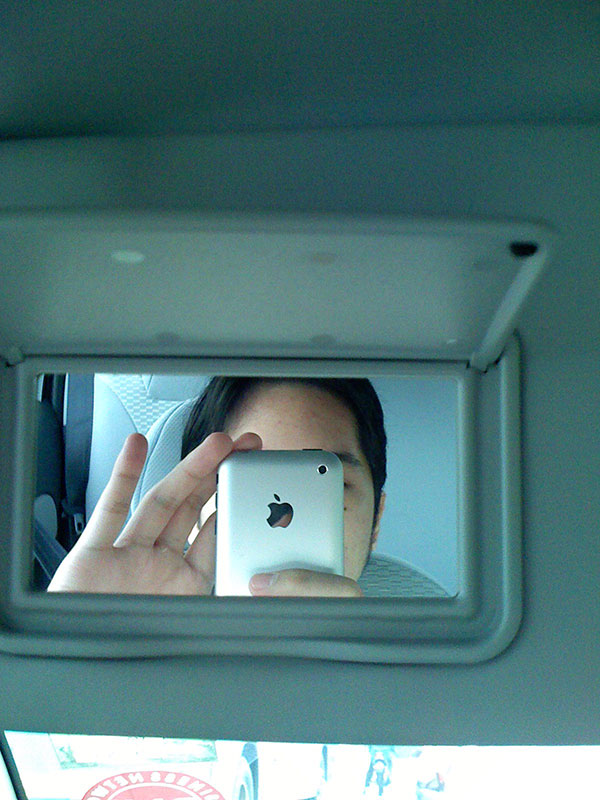 Once everything was set up, it was time to sync my Apple iPhone with my Windows PC for the first time. Once connected, the iTunes popped up and detected my Apple iPhone device. Here, it took to a very simple wizard asking how I wanted to sync my contact, my calendar, my internet browser bookmarks, music, podcasts and videos. The syncing of data was very fast and photos I took with the Apple iPhone were transfered unexpectedly very fast as well.
 Now, the Apple iPhone camera may not be a 3 Megapixel or 10 Megapixel to brag about but I have to admit this camera is one heck of a capture tool. Pictures taken in good light seem to look clear on the Apple iPhone screen and makes you doubt if it is that clear. And I have to admit it, the pictures were really that clear. Phone cameras in low light have never been expected to produce top notch camera quality so the Apple iPhone is about the same here.
As the day ended and I flashed the Apple iPhone to a coupe of friend in Malaysia, it was time to see if my Bluetooth handsfree could be detected with the device. Before I tell you how that went, here’s some additional information about the Apple iPhone. You can’t transfer files to friends via Bluetooth. According to Shiew, he said this is to prevent the ability to hack your Apple iPhone later. Anyway, the connection of my iTech Bluetooth headset didn’t prove successful. So I’m assuming that’s another strike for universal compatibility of the Apple iPhone.
Tomorrow, I hope to tryout the iPod and video functionality of the Apple iPhone. Hopefully as well, I could get Hotlink to answer to my query on how do I forward calls using my account. So that’s that for now on the Apple iPhone in Malaysia from me. Please feel free to click on the images and view them at a larger state.
Question of the day:
Would you like to tryout the Apple iPhone I have?
[tags]Apple iPhone, Malaysia, iPhone review[/tags]
Sweet. The iPhone isn’t in Aus yet!
I am grinning coz I have both Digi and Celcom but not Maxis. For some reason I am biased against Maxis, haha.
I’m happy with my Nokia… I don’t use the more advanced phone features anyway so there’s no point for me to get an iPhone. I only use my phone to call, SMS, set alarm clock, put event reminders, and calculate figures! (My phone has no camera function)
Our experience with WiFi is typically trouble free. This could be a case your router being some weird genre rather than the Apple’s non-compliance.
On bluetooth compatibility, our experience is similar to yours. The upshot is, you have VERY good reason to migrate to Apple’s bluetooth headsets. Check out their designs!
Chewxy:
If you bought one of them, I bet you’ll have a ball using it in Australia. I can’t fully utilize my Maxis here on the iPhone.
Sunflower:
I’m actually starting to need a proper appointment organizer which syncs to my Outlook so the iPhone is handy in that. As for the calculator, I’ve got a big one on the iPhone. :P
Besides that, well, if you don’t do much on the phone then you won’t enjoy much of it’s features.
iPhones Unlocked:
Yes, I realize it’s something to do with my settings or wireless setup itself. I’ve tested so far on different locations and can’t seem to get it working on my home network. However, my Apple MacBook doesn’t experience any of these problems.
As for the bluetooth, design is one thing but I’m not too happy of having to buy an additional bluetooth for the sake of a new phone. Bluetooth and wireless are meant to kinda be ‘universal’ so if I had to buy a different tools for different devices, it isn’t feasible to me.
Anyway, so far I’ve gotten a lot of enquiries on the iPhone this morning. :P
Got an iPhone myself, same problem. On Maxis, I cannot receive calls or sms. Tried it on Celcom and had some problems as well. Tried it on Digi prepaid and it worked fine. So I guess I’ll be getting a Digi prepaid sim.
Wifi wasn’t a problem, using a D-Link modem and router. Loving this baby to death! :)
“Today, with my Apple iPhone in Malaysia I’m exploring the iPod capabilities. So far as I’m listening to it, it’s really really really good. :)
How much of the Apple iPhone have you explorer so far?”
Had it since Tuesday last week, can’t take my hands off it since I got it.
1. iPod
iPod sound is great, and actually very ok using the speakerphones. Haven’t tried in noisier environments like malls.
2. Video
Used Handbrake and ripped The Last Samurai on to the iPhone. Video is good and smooth.
3. Imported about 3000 contacts from my Palm LifeDrive to the Address Book, then synced with iPhone, no problems, except maybe a slight delay when selecting a contact to SMS.
4. Synced all my LifeDrive events on calendar since 2003, into iCal, then synced with iPhone, again, no problems. Love the Calendar interface on iPhone.
5. Safari works great! One of the things I love most about the iPhone. I recommend http://iphone.beejive.com for your IM needs, at least until Apollo IM includes gtalk support.
Hmm apart from that just general fiddling around. Only thing I wish there was a To-Do List. For now I just name the first note in the Notes Applications as “To-Do List” and list everything out there.
Hey Imran,
1. I’m doing a followup on this as you know.
2. Haven’t tested the video yet but from what I’ve viewed via YouTube. The quality is great.
3 & 4. You’re syncing the phone to your MacBook if I’m assuming correctly.
5. I’ve got to give that a try. :)
I haven’t had the need for a to-do list but I guess it’ll most likely come in handy as a shopping list later.
aw man i wish i could get my hands on this puppy why are you guys driving me nuts this side, give us details on how to get one i have been waiting too long for the iphone, i’m even considering on getting the htc touch cause i can’t get my hands on an iphone. Loyal fan of apple.
The Apple iPhone woops that particular model any day. :P
And I have to admit as the days passed, I’m loving the iPhone more and more. *grin*
Hi guys, got an iphone. Tried out Maxis, Celcom and Digi. As expected, only celcom and digi allows calls to be sent and received. HOWEVER, SMS cannot be received from all 3 systems. Is this the same experienced by all or is it just me…
Yoga:
Nope, I’m experiencing no problems with SMS at all.
I’m using a new DiGi starter sim pack I bought just for this review. Haven’t come across any problems with calling out or SMSing in or out.
Where’d you get your iPhone from and was it hacked and activated by yourself…?
Yoga, you prob bought a unit that was unlocked using the free method. There is a diff between paid and unpaid software. If you like get my contact from danny and let us have a look at your set. If the damage is not big, we may be able to fix it for you. Where did you buy yours?
hi just bought my iphone. but the digi line is unpredictable. sometimes there is reception, sometimes not even…at the same location. experimented on another phone using the digi line…perfect reception..any ideas..tks
I have come across something like that in certain areas as well. But when I’m home, the connection seems to be fine throughout. Last I heard from a friend, they’re upgrading the DiGi network.
That…may be the cause of it. :)
I think the reason why it doesn’t work with Maxis its because of the new simcard which supports 3G, and this current iPhone doesn’t support 3G. I think you should try to use the older Maxis sim that doesn’t support 3G. Or, wait for the next iPhone where it rumored to support 3G.
Let me know if the older simcard method works or any other solution because I’m in US now and I’m planning to bring my iPhone back to Malaysia. Thx.
I don’t think my simcard is the 3G version, Alex.
How would a Maxis user be able to tell its a 3G-enabled simcard?
Last I remember, I only upgraded my card to the 128k version or something like that back 5-7 years ago I think. :P
Wow….so many comments about IPHONE,is it really so cool?I viewed the IPHONE Trialer via APPLE official site.It was really sounds great.Moreover,i was also attracted by its features and NEW FEELING(ALL in TOUCH).But i was still doubt about the actual price and where to buy.And may someone tell me more about the difference between a lockedphone and an unlockedphone?Is it mean unlockedphone=cracked’s software?Why so?……I still have many doubts on it.Hope all experienced mates may help me to solve all my DOUBTS via here?or direct via my email is better..Thank You!!
Lemonsz:
You can get the iPhone in Malaysia from iPhones Unlocked. As for the price, it depends what are you looking for. Is it just to have the phone or to have the personal support as well. There isn’t an official price because this product is due launch in Asia only in 2008. The units you see around now are parallel imports.
And yes, unlocked iphone’s mean the reseller has made it possible to use other telco providers besides AT&T. The story of the Apple iPhone is an agreement was signed when it was released, only AT&T telco (USA) subscribers may use the phone in the USA.
Your doubts could be posted here as well.
p/s: I’ve removed the comment with your email in order to protect your privacy. Regards.
i think i’ll get other phone first while waiting for iphone to launch in malaysia.
It won’t be ‘launched’ in Malaysia per se. I’ve yet to even see the official launching of other Apple products, And by launching, I mean really like someone important from Apple comes down to do it. Just like Canon, Samsung and etc.
In the meantime, I’m content with my QWERTY keyboard and sharp photo taking on the considerably thin iPhone. :)
Rumours of the 3G version for Asia is still about but no official declaration has been made just yet.
OMG! i’m REALLY looking forward for iPhone to be in Malaysia’s market! where can i get one???
If you’re willing to part with RM2800, I could get the 8gb unit for you by the weekend. Unlocked running 1.1.1 :)
Regards.
thnx but no thnx, but do you think i can get the iPhone from low yat?
is it true that u can’t get the MMS and GPRS to work on the unlocked iphones?
blush:
You can find it around more today. But upgrading it in future without too many tedious steps is another story. So far, I’ve read one method for 1.1.1 and not only required you to be very tech-savvy but also involved more than 20 steps. The one I’ve been given and using only required 10 steps more or less.
Acat:
The phone doesn’t support MMS. The only method so far for sending a photo is through email. The only thing you can do for SMS is to text message. So like the camera, these are the basic functions in order for them to function properly.
As for GPRS, there’s no option to set that as well (username/password/server) but you have EDGE though. Rumour has it the Asian version will have 3G but it’s still speculation.
serious? cannot transfer files between friends via bluetooth? and can’t use bluetooth headset as well?
nana:
Yeah, apparently it’s an Apple method to prevent from bluetooth hacking. But obviously, if you come to think of it if they wanted to hack they’d find a method no matter what.
As for the headset, my limited edition iTech doesn’t work with my Apple iPhone nor my Samsung L760. It’s not the battery so I guess it’s a phone compatibility thing.
Got an iPhone (1.1.1) from US apple store and tried to hack myself… recovered a few times but finally get it to work.
Loving this baby, good solid piece of electronic steel… but it could be more lovely if they make the SMS feature more user friendly.. so far i have yet to see an app that proper manages the incoming and outgoing messages. If anyone knows – appreciate that you can share. I’m still very very new on iPhone.
2nd question: Does any know when Maxis will get their hands on the issue and release the long term solution (no call forwarding)…
3rd question: Will flash ever be supported?
4th question: Is there a way to convert the QWERTY keyboard to the oldschool keypad? :-p Still cannot get used to the tiny keys…
5th question: hmm… some killer apps for the iPhone? :D
That’s a lot of questions but am really looking forward on making it a perfect phone… some of the iPhone owners out there must have the mutual sentiment
Thanks!
Congratulations on your purchase YT and thankfully you managed to hack it instead of break it. :)
I’ve no qualms about the user-friendliness of the SMS. Maybe it’s because I’m just too used to it.
Maxis is supposedly working on it but no conforming news just yet.
Well, they’ll need to integrate a supported mobile Flash version for the iPhone. I’m keen yet feel worried of having Flash enabled on the iPhone because it can get resource heavy. I’ve personally experienced some lag on the iPhone when on a website with too many javascript loading. With my javascript turned off now when I surf, the performance is just awesome.
A friend of mine did ask if a person had really wider finger tips then would it be difficult to type on the QWERTY keyboard. I personally think it’ll be more difficult as you will have to angle your finger in order to press the keys. I don’t support the old school keys but I think it’s a good idea to be able to convert. :)
There are plenty of apps for you to try. You need to get Installer.app into your 1.1.1 first. ;)
Man, it’s just too expensive for the casual phone lovers who would just like to make a phone call
That is why it seriously depends on what kinda mobile phone user are you and how much you want the iPhone. :)
how come apple stores don’t sell the iphone yet ? and some stores in sungei wang do ?
see a little story spiced up with your info on http://www.skype-gadgets.com. best regards. jan geirnaert.
hello jan,
I’m assuming you’re saying they’re not selling them in Apple ‘reseller’ stores in Malaysia. For one, Malaysia doesn’t have an official Apple store. These Apple shops you see around are resellers.
Sungei Wang is the haven for new mobile phone models. The biggest problem is whether or not you’re paying for an authorized unit or a parallel import one. Recent news is they’re mixing the packages up, replacing original accessories with imitations and etc.
You’ve got a great Skype-driven blog. I’ve never seen anyone with that much passion into Skype. Especially with all those phones! LOL!
p/s: Thanks for highlighting the many iPhone posts I wrote. :)
Thanks you for your suggestion ( Maxis in my Apple iPhone then use my DiGi number in my old phone.) …. Maxis really suck … do you know when will they fix the problem? maybe i should print out your blog and complain to Maxis customer service….
Yo Isaac,
Nobody knows if they are even fixing it. :P It’s just words we’ve been hearing around they are trying to fix it but there’s not concrete evidence.
It’d be nice to show them how powerful a blog is marketing a local telco like DiGi and the Apple iPhone at the moment. It’ll hit them where it hurts making them more aware of the market they’re slowly using in the high-end segment.
Oh, if you’re planning to send it – aim for the top as this’ll never get to the marketing managers if you go through customer service. LOL!
Hi Danny,
No i just upgrad my sim card to 3G sim card last week, the Maxis tect guy said this will work…it still can’t work. Every hand phone seller telling me the same thing… that Maxis won’t work on iPhone ….. really suck i has been using Maxis for over 10 years …. i dont wanna change my Number…
If customer service won’t work ..then complain to My FM ” wo yao qen tao” ..wahahahah ….
Isaac, I think what they did is that they got you to upgrade. :P
Anyway, I wouldn’t mind applying for their Hotlink 3G version because I’ve got a free Samsung L760 to try it on.
As for Maxis, well…Isaac is a real 10 year loyal consumer and he demands retribution. LOL!
upgrad to 3G is free …the problem is it still won’t work ….
Well, we can’t do much about it unless we know Ananda Krishnan or the CEO of of Maxis directly. Hmm, maybe someone should give them an iPhone as a present then they’d realize. :P
wow…. iPHONE! its reli nice. and i adore it so much but what??? cant use ipone with maxis account? thats so sad. cause am currently using maxis account. and i aint a fan of digi and celcom that much. ): awhhh man..!!! well, well, everything is improving and hope there is a speedy improvement. and its a good thing that iphone has arrived in malaysia. how sweet is that ,dont you think? :D
Well, it seems Maxis is doing some tests in selected areas at the moment. :)
http://www.dannyfoo.com/blog/2007/11/maxis-support-for-apple-iphone-in-malaysia/
I hope by year end, they would’ve covered all of Malaysia then my Apple iPhone experience would be complete. :D
hi all, I experienced hot earpiece for 5 min tel conversation. Signal sometime up and sometime down. Never had this with 1.0.2 before any idea guys ? I’m using digi
I think the hot ear is rather common. And Apple products have been known to release some amount of heat…even on my MacBook.
As for the line bouncing around, I used to experience it. Were you cut off while talking?
Yes, drop call is common after upgraded. Strange that….the heat, drop call was never an issue before.
I asked digi to change my sim card , but still the problem persist. Shold i reinstall or 1.1.1 or revert to old 1.0.2 ? Will the 3rd apps installed gone ?
Did you have any problem of the drop call while you were on 1.1.1?
The 3rd party apps will always be gone when you restore the phone. Whenever you restore the iPhone, it’ll wipe out all the apps you have.
Recently i was travelling arounf China and Hong Kong and saw lots of Apple iPhones, already cracked. Most were the 8GB as 16 GB model not out yet. Lowest price saw was at HK4999, which amounts to RM 2,400. Quite popular especially in Hong Kong.
One thing for sure the features and the phone itself is real cool ! Sure look forward to own one.
Also the phone shops in Hong Kong will help to crack and open the software for those locked coming from US for a fee of HK400.
Johnny, I’ve heard a number of other buyers or travelers saying that returning from Hong Kong. And I’m not surprised because even the Apple MacBook Pro notebooks are cheaper in Hong Kong compared to here and even Singapore!
However, as some may calculate the RM2400 is only the unit without traveling and etc. Plus, if you bought it from Hong Kong do they have a local guy here to help you with your troubles?
If they’re selling anySIM iPhone for that price, it’s RM100 more expensive than MAXIMiPhone (my reseller) here in Malaysia.
Hi Danny,
So is there any way for PC users to install 3rd party applications into v1.1.1 since iBrick doesnt support it?
Regards
Xander
Hmm, I can’t seem to Google any freeware apps to be used. And besides iBrickr, all I’ve heard around are those other paid ware stuff. :(
:-( Sad news indeed for us PC users. Folks at Sg Wang wanted to charge RM300 to download applications. I said, “my *#%”. Anyway, thanks Danny.
Regards
Xander
That’s crazy man. I might as well use my credit card, purchase a PC software to do the stuff I need on the iPhone and charge only RM100. Or may be not.
But yeah…RM300 to just transfer stuff is ludicrous. Although the iPhone is still selling around RM3000 in some other places. LOL!
Hmm, maybe I should start something like RM50 for 10 applications or something. :P
U do that, Danny. And dont forget to give 80% discount for ur friends in this blog ;-)
Come to think of it…you can install apps on your own. How come you need them to help you install?
Besides the ringtones that is…
iPhone does not dierctly allow installation of 3rd party software application. However, many would runn off your Safari browser. A good example would be in the http://www.iphonesource.org. If you have an application whic will run, install open SSH on your iphone using installer. Use WinSCP (Windows user) on your desktop. You will be able to transfer applications across. Remember that the correct directory and permisions will be required.
Danny:
Because i thought PC users with iPhone v 1.1.1 cant install applications since we cant use iBrick (Response #49).
Yoga:
What is SSH? And from where can i get the info on the directory and permissions?
Thanks.
Funnily, I thought as long you have the Installer.app then you shouldn’t have a problem installing applications like MobileRSS and etc. Unless you were referring to different 3rd party applications?
I’ve been installing MobileRSS and some others through Installer.app without any problems. I’m running on 1.1.1 with iphonesimefree so I’m not sure if it’s that or the application you look to install is something unavailable in Installer.app.
hey i wanna test it try i wanna try it i wanna feel it!
where about are you, flx?
if you’d like to take it for a spin, it’ll have to be central between PJ and KL. :)
SSH is easy to install if you already have installer application on your springboard. You must select it from Installer – Install – System – OpenSSH.
If you do not have the installer, then your phone must be jailbroken. (like all the iphones here in Malaysia. Run http://www.jailbreakme.com from your iphone safary browser, read the notes, scroll down and click install. WAIT for the installer to reboot automatically and… its there. ENJOY
iPhone users with MAXIS can now receive incoming calls in Johor Bahru… Not sure if it is the same in all areas…in this city.
I have been using my iPhone with Maxis for three weeks now and have no problem at all.
hi, i’m nearly to buy iphone in sunway for rm1800 ( 8gb, 1.1.4 version ) but thinking of update software as comeout recently in apple website…i think i can wait for few months for original iphone to land in malaysia and start saving from now….think again….can’t wait but patient pays…………
nasir:
Everyone is now saying they’re going to wait for the official version in Malaysia. Well, we all just hope it’ll be this year itself. :)
will it be this year? according to some apple fan site that saying asian version will be equipped with 3g and will be launch in q3 2008 meaning somewhere sept 2008 if not mistaken. hopefully….my finance minister ( wife ) object me to buy iphone in advance but convince her that i will wait for the real thing coming to malaysia then she agree with that…btw the n73 nokia seem ok for a while……..
Dear bloggers,
FYI i juz got my iphone as a besday gift from my beloved bf. I do like tis phone but da problem is i dunno how well are the features. 1 of the prob is I cant use bluetooth with other devices. …and can we assign real tune or mp3 so on as our ringtones?? oh ya is there “delivered msg report” availble for tis iphone…Please do guide me since im new wit tis phone
thanks…
do visit http://www.imserba.com there are a lot of free application for iphone can be installed.
Shana:
The bluetooth thing is something I bet all iPhone users have felt. As for the TrueTunes, nope…but mp3, yes. I’ll try to get Tim to explain that to you in a simple manner he knows. It can get quite technical.
And nope, there’s isn’t a message report function built-in like Nokia if I’m not mistaken. How do you use such a function? Maybe we could recommend an alternative application. :)
do you have youtube to show us how it is like in real life iphone really works and what u will miss from ordinary phone when using iphone? such as cannot bluetooth songs, only certain bluetooth headset can be use, is it easy to transfer songs to iphone, easy to use pc connect to iphone….etc….what i know the price is quite high but the technology is suitable with the price but real life experience in malaysia needed to convince people to buy iphone….
I could do a mini video demo of the iPhone but the most impact is when you’re a first time user playing around with it. This tests the phone’s usability factor and how easy it is to use.
As for the information on what it can’t do, I think that’ll be a great topic for Timothy to cover in a post later on. Thanks for the recommendation. :)
Danny :
Yeah im looking forward something excited from u guys..atleast i know my new ph is worth it to keep :)
i’ve went thru several youtube video regarding the iphone experience but most of it in us and uk…need somethings from malaysian who bought iphone and their experience other than facts n figure, that i’ve already download a lot of articles and videos regarding the facts…hope to see mr danny video or life experience to be share with other malaysian who interested to buy such a beautiful iphone….really want it but need to save some loot before dream come true….maybe if there are any contest that give iphone as rewards…lol….tq
We’ll see about it, nasir. I’m preoccupied with my own web design work at the moment.
hi everybody…im the iphone user since jan 08..wanna hack your iphone…just email if you got prob regarding your iphone.. f.o.c..
Thanks for dropping by and sharing your findings, syed.
Unfortunately, I’d appreciated if you respected my blog and its integrity as well. Therefore, I’ve removed the previous link and other comment you left behind as I found it unnecessary.
But I’m sure other readers here would benefit your iPhone knowledge if they have any problems later. :)
hey, i have iphone 16gig for sale. brand new still seal in box…edited by Danny
While I appreciate and respect you trying to do your business. I’d appreciate your respect from advertising your business in my comments. There are other places you could sell your phones like Low Yat forum, Lelong and even Mudah (advertised on Nuffnang).
Therefore, I’ve edited most of your post (instead of deleting) the comment itself. Thanks.
NEED HELP>>>>>>>>>>
i found my Iphone 16gb, version 1.1.4, the bluetooth cannot use, just hang or searching and searching, any solution to fix this issue?
Check out all the iphone application such as iband and idrummer.
Andrew:
What are you pairing up the Bluetooth with? If it’s a headset, are you sure the headset is iPhone compatible? If it’s a Mac, I’ll go test it out.
Joseph:
Haven’t tried those applications before. It produces music?
Danny Foo:
With idrummer,you can play drum on your iphone even piano.its so cool!! and also iguitar.go to youtube.com and type iphone or idrummer.they will teach you how to install it and its a free application but beware it may void your iphone warranty once it install.so please read carefully first before install it.
Hey Joseph,
Thanks for the heads up. Otherwise, many music users might just download and install without realizing its effects.
unable to configure Edge for celcom sim. Any help?
hi, it’s nasir again. I sure to buy an iphone next month due to some extra cash obtained. is it wise to get it now or need to wait for some times? i really fascinated with the features,design and all about it. Please advise me because i sure buying it next month. i heard and saw that with rm1600 i can own new iphone?
samchin:
Urm, I haven’t found an answer at the moment. :(
nasir:
You contradicting yourself. Don’t do that! :P Anyway, if you have the money then buy it lor. Otherwise, just wait it out to July and see if the iPhone 3G (or v2.0) or whatever they want to call it does come out. LOL!
it’s wise to wait…bcos generation-1 iPhone battery is not good enough to handle 3G chipset..it’d just drain the battery which would only last you 1-2 hours of use.
Apple need to achieve at least >5 hours of use before they will launch an iPhone with 3G…
can i use 3g sim card celcom with iphone…i ask celcom staff they said it might work and might not work depend on luck…how come…or is it just their lack of knowledge of iphone at this moment…whatever i will wait until july and if end of july nothing happen on iphone i will get one iphone for myself….tq
I’ve a feeling their staff are unsure, Nasir. However, I’ve known other Celcom iPhone users around. Though market is mainly dominated by Maxis and DiGi.
Nasir, that’s a good strategy to adopt…I believe celcom will make it work eventually.
i saw azhar sulaiman who play shah in 6.30 pm series Bella using iphone and on sunday i went to pasar tani shah alam i saw one auntie using iphone playing chess while waiting due to heavy rain…that’s cool man and i certainly will wait until july 2008 due to new rumors said that in june 2008 new gen of iphone will be released….tunggu….
new 3g iphone come out in 9 june in wwdc ? what else can it offer? tunggu……
if we could use spare battery that would be swell…alternatively 3g feature could be turned off to conserve battery life hopefully…just like turning off push mail, wifi, bluetooth
iphone 3g will be available in july but malaysia is not iin their map, can we get the hack iphone 3g in malaysia like we have before…it is worth a wait for such beautiful phone with most of the features same as other smartphone but less price…tell me if the iphone 3g is available in malaysia….
iPhone 3G will be tough to get as I heard new or existing users that wants one has to activate it at the store with 2 years contract. There will be a penalty if someone breaks the contract. It will not be available online for awhile.
In other words, besides the US299 price tag, if someone is willing to pay a penalty of several hundred more to break the contract, it’s still attainable.
Can’t wait till July 11th but the line will be sooooooooooo long. “Sigh”
hihi every, i tried sim unlocker on iphone 3g with maxis it didnt work. So far digi and celcom has no problem and stable. Anyone know the differences between these all 3 sims? (maxis, digi and celcom) Why some works and some dont even though they are the same sim card being use in the same phone and with the same unlocker??? appreciate if anyone could give me some answer. Thanks in advance
Unlocker doesn’t support all of them? :P
I’ve not heard of sim unlocker.
whens maxis bringin iphone to malaysia officially??
There’s been no real news, homer. Though someone recently mentioned Maxis has officially won the contract. On the other hand, we won’t say for certain until we’ve seen concrete proof of this later.
can u get new of set Iphone 3g for me?
and what about the price.
Amin, I’ve emailed you details for this. :)
Unfortunately, my reseller doesn’t have any stock now for even the iPhone 2G.
Hai Danny,
Can we bluetooh with other phone like nokia or erricson ?? I’ve tried but It doesn’t work. Please advise. Thnaks
Nope. You can’t transfer files over a bluetooth connection using the iPhone. Apple last mentioned reason behind it was because of security reasons. The only methods of sharing I know today are email or over a wireless connection besides bluetooth. :(
hello danny,..
where are you from…???
have you upgraded you firmware to 2.1 yet???
actually there is nothing wrong when using maxis sim card…
have a nice day :)
Robin:
I’m from Malaysia and yes, I’ve upgraded to 2.1 already. But on my 2G iPhone with 4GB capacity only. And yes, Maxis doesn’t have a problem – at times. :)
Hello Danny.. Are you Sabahan ??? You buy your iphone at Center Point Kota kinabalu ??? I got problem with my iphone..
1. The caller name does’nt apear even i’ve set the name at contacts
2. Can’t forwad sms to many friend
Do you know how to solve it ???
Nope, I’m here in KL/PJ Siddiq. :)
1. You’ll need to replace the PhoneNumber list file in the iPhone. Or, try CallerID by Spazio (you’ll need Installer): http://tinyurl.com/5qfe3m
2. If you’ve got Cydia (or App Store), install BiteSMS.
It’ll also be helpful to know what firmware are you running and if you’re a 2G or 3G iPhone user.
I’m 3G iphone user..I got Cydia already, Tq bro..I’ll try to install CallerID..
Hohohoho..dun know how to domnload + install the program maaaa… huhuhu..
Ok..i dah paham sket2..that stuff bleh dapat melalui Cydia kan ??
Tq very much Bro..my problem has been setle already..
No worries, Siddiq. Glad you have that sorted. :)
bape ar harge iphone ni skang?erm software sng x nk dpt kt malaysia and kt mane?thx…
Last I checked prices are still the same. Now, they’re all the 3G version srtarting from RM3200 for an 8GB with a bundle of US200 worth of iTunes credit. This’ll allow you to download premium software, shows and movies. :)
Hiiii der…would like 2 enquire u about this apple i-phone 3G..is it possible if i purchase an apple 3G i-phone in USA & use it in Malaysia under digi network??? Really looking forward to the answers…..thxxxx so much !!